Monday, March 10, 2014

Blog Hop Monday with Lori Whitlock and her Design Team


Hello and welcome to another Lori Whitlock Blog Hop.  I've got the entire blog hop list at the end of this post in case you landed here by accident or got lost along the way.

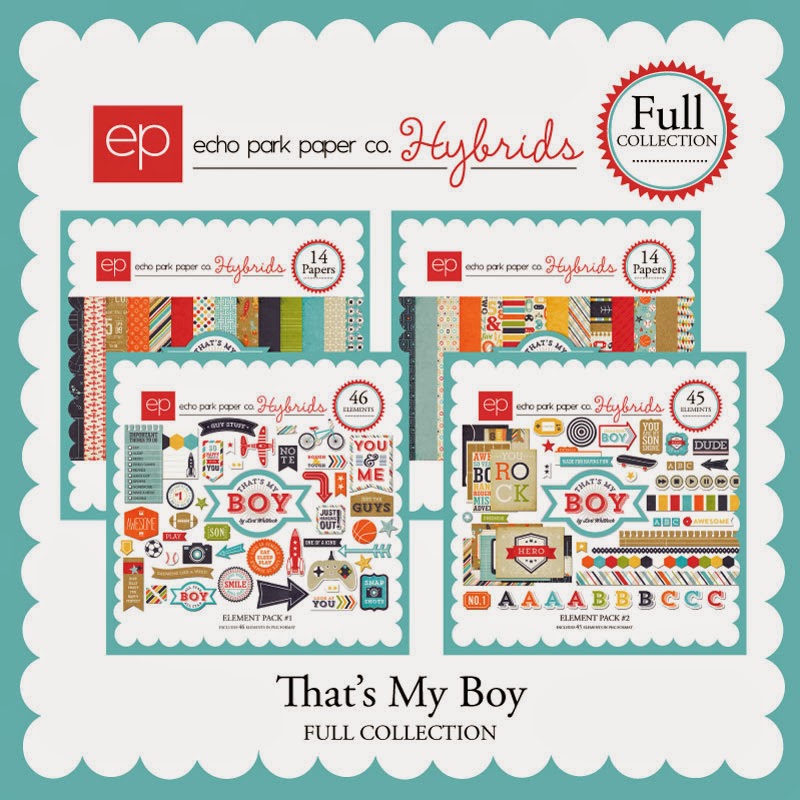
I decided I wanted to make a clock for my soon to arrive grandson's room.  Lori's "That's my Boy" collection was just perfect for such a project.


To make this clock I simply bought a cheap clock at Walmart ($4.99), removed the screws in the back and disassembled the clock by removing the plexiglass off the front and carefully lifting the hands of the clock straight up.  Using photoshop I made designed the patterned background.  I then used my Silhouette to cut the image, because let's me honest, I stink at cutting straight lines, let alone circles!  You could easily cut it out with scissors.
http://www.jessicasprague.com/index.php?page=shop.product_details&flypage=flypage.pbv.tabs.tpl&product_id=4302&category_id=78&option=com_virtuemart&Itemid=328
This collection has everything you need for all of those boy projects!
Now, lets get on to some more fun stuff.  Lori has generously offered a freebie for me to give you.  Yes, you heard me.... FREE!  It's only good for today and there is one at each blog stop, so make sure you collect them all!  After today, they will be available in Lori's online shop at JessicaSprague.com
https://www.dropbox.com/s/yr54v8rg8vm915k/LW-Photo-Prompt-Tags-place.png

Click on the image above to get your "Favorite Place" tag TODAY ONLY!
These freebies are great for all of you Project Lifer's and Scrapbookers.  I placed mine on a photo my son took on a board headed into Chicago.  If I were scrapbooking this photo, I would cut this out with the Silhouette and pop it up with pop dots.


As if a freebie isn't enough, Lori has given you a coupon to....wait for it...... 30% off her entire online store!!  I mean, seriously, does it get much better than this?!!!


Ok, now it's time for us to part ways.  Thanks for stopping by and don't forget to collect a freebie at each and every stop along the blog up!

Lorrie Nunemaker (you are here)

Sunday, March 9, 2014

I Choose Happy

Hello there!  I love the freebie Heidi Swapp is offering on her blog that says "I choose happy".  I just had to use it on a layout.  Using my Silhouette, I cut it out three times and layered it to add some depth.


I used the Welcome Spring collection by Imaginisce for the papers and most of the embellishments.  This collection has been my "go to" lately.  It's so happy, bright and fits so many occasions. 

Pattern Papers:  Welcome Spring by Imaginisce
Embellishments:  Welcome Spring Die Cuts, Journal Tags and Gems by Imaginice, Die Photo Frame by Amy Tangerine, Tag by Amy Tangerine


Saturday, March 8, 2014

Silhouette Tutorial - How to Print and Cut

Hello everyone.  I've got another tutorial for you.  This one came from a question a reader asked.  The question was "How do you print and cut an image from the Silhouette store".  It's a two-part question.  There are both PNC (Print and Cut) and (Cut only) images in the Silhouette store.  Both can be both printed and cut using the Silhouette software.  This video explains the difference.

Saturday, March 1, 2014

Video Tutorial using Silhouette Cameo or Portrait and Digital Kits = Hybrid Elements

Hello and thanks for stopping by.  Lately I've been making lots and lots of Hybrid Elements.  What are hybrid elements?  It's an element that is made with a combination of digital files and real paper products.  The Silhouette Cameo and Portrait make this so easy and fun!   All of the elements on this card were printed on my printer, then cut on the Silhouette.  I also cut the elements in Chipboard, so they are nice and sturdy.


I made a video for those of your who would like to try this with your favorite digital files.


This is the digital kit I used "On Trend" by Crate Paper

Wednesday, February 26, 2014

Imaginisce - Die Cuts Week


It's Die Cuts Week at Imaginisce!  This week we are featuring the beautiful Die Cuts from the new CHA Collections.  I chose the "Welcome Spring" collection to make this card.

 Stop by the Imaginisce Blog to check out all the details


Tuesday, February 25, 2014

Using the Silhouette Software on the Ipad

Hi everyone!  I made a video once before, but it was a quick one with my phone.  Here's a video showing how I can use the Silhouette Software on my Ipad.  The number one question I get is "I don't have Ipad, or a mac... can I still use this method"?  The answer is yes.  Splashtop works with Android, Windows, Kindle and many other operating systems besides OSX.


Friday, February 21, 2014

Sweet Baby Card

Hello!  I am loving the "My Baby" collection by Imaginisce.  There are so many cute, cute elements to the collection.  I made this cute card using the My Baby Girl papers and stamps.  I also used the American Crafts Knock Out Punch for the cute white border.  If you haven't tried that tool, you need to!

It's quickly becoming one of my favorite current collections. 

Products used:

Imaginisce:  Pattern Papers (My Baby), Stamp (My Baby)
American Crafts:  Twine, Cardstock, Knockout Punch, Foam Adhesive, tape runner
Other:  Sentiment Stamp (Papertrey Ink), Precious Chipboard (Maggie Holmes)

Wednesday, February 19, 2014

Hip to be Square - Epiphany Crafts Square 25 Tool

It's Hip to Be Square week at Epiphany Crafts!  I love the Square 25 tool and thought it would be perfect for a QR Code card.  Check out the Epiphany Crafts blog and the video below to find out how to make one!


Saturday, February 15, 2014

Sweet Baby Layout using Imaginisce My Baby - Girl Collection

Hello there!  Today I wanted to share with you a layout I made to celebrate my niece who made her appearance just before Christmas.  Isn't she sweet!!! I haven't had the pleasure of meeting her in person yet, but hope to soon!

To document this little cutie I used the Imaginisce Collection called My Baby.  There is both a Boy and a Girl version of papers and embellishments.   This collection is so sweet, soft and lovely.

Products Used:

Imaginisce:  Pattern Papers (My Baby), Die Cuts (My Baby), Buttons (My Baby), 3d Stickers (My Baby)
American Crafts:  Knockout Punch, Twine, Tape Runner, Foam Dots

Friday, February 14, 2014

Thermoweb / Authentique / Valentines = FUN STUFF!! Valentine House

 It's therm-o-web meets Authentique week at thermoweb's blog.  Today this fun Valentine Gift Box/House I made is featured.  You can check out all of the products used here!
 I love the new collection by Authentique called "Smitten".  It's got so many fun elements and paper patterns.  It's a must have this Valentine season!

This house was a cut file I purchased from
  There are so many fun files in this collection.  I simply bought the download and cut it with my Silhouette.  You can watch a very informative video on her website on the actual construction.

Tuesday, February 11, 2014

Quick and Easy DIY Valentine Gift / Wine Charms with Epiphany Crafts Round 14

Hi there!  It's Valentine Gift Ideas week at Epiphany Crafts.  I made these super simple, super quick wine charms using the Epiphany Crafts Shape Studio Round 14 tool, Bubble Caps and Charms.
Hop on over the Epiphany Crafts Blog to get a full tutorial on how to make these yourself.  Oh and there is a freebie below and on their blog for the Valentine Artwork I used.


http://www.4shared.com/download/ntltHTNwba/Round14Valentine.pdf

Monday, February 10, 2014

Blog Hop Monday with the Lori Whitlock Design Team Featuring Valentines!


Hello and welcome to another Lori Whitlock Design Team Blog Hop!

You probably have arrived here from Ashlea Cook's blog but in case you just stopped by or got lost along the way or just want to go back and start at the beginning, I've got the entire blog hop  linked at the bottom of this post.


For my Lori Whitlock Valentine Project, I knew instantly I wanted to use the Echo Park Love Story digital collection which Lori created.   Love Story is a super fun Valentine kit which is suitable for all ages of Valentine projects.


 I created a template in Photoshop and made mini Hershey nugget candybar wrappers, which I simply printed, cut and then wrapped around the candy.  


Of course, every gift needs some cute packaging!  I used Lori Whitlock's Sihouette cutting file for this cute little candybox.

Products Used:
  Love Story Collection by Lori Whitlock for Echo Park


http://www.echoparkpaperblog.com/echo-park-paper/2012/12/new-love-story-digital-collections-now-available.html 


http://www.silhouetteonlinestore.com/?page=view-shape&id=24625
Now... time to grab your coupons, freebies and a chance to win a $10 gift certificate then on to the next blog for more Valentine inspiration!

Enter here to win a $10 Gift Certificate to Lori Whitlock's online shop


Right now you can go pick up the Silhouette Studio Designer Edition for $29.99 (reg price $49.99).  Use promo code LORI at the Silhouette Store


Here is a list of the entire bloghop.... Make sure you stop by each blog and see what fun Valentine project each of the girls have created!

Lorrie Nunemaker (you are here)


Friday, February 7, 2014

Valentine Shadowbox using Lori Whitlock's Silhouette Studio File and Love Story

Hi there! 
I've got another project featured over at http://loriwhilock.com today.  I made this using Lori's Silhouette Studio file for the Shadowbox.  Yes, that's right!  This frame is made with the Silhouette and 12 x 12 papers!  Pretty cool, eh?   I decorated it with the Love Story collection which was also created by Lori Whitlock for Echo Park.

Tuesday, February 4, 2014

Happy Valentines Day Gift with Imaginisce


My project (above) is featured on the Imaginisce blog today!  I am so excited about this new line of papers by Imaginisce called "My Baby".  They are not only great for baby girls, but perfect for Valentines!  Check out my post over at the Imaginisce Blog for more photos and details on this fun gift idea!
view sourceprint? 01 09 10