Well hello there! Happy Tuesday! What a week it's been!
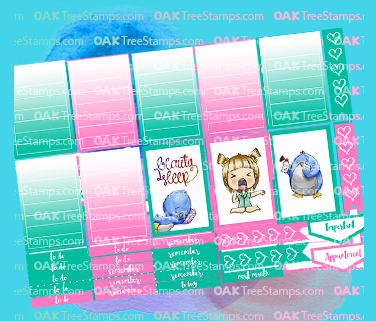
I have been working here and there on this little mini collection for the Happy Planner. I bought the clipart, but designed all of the papers myself. I am so proud of how it turned out. I thought I would share this little collection for a limited time as a way of saying thank you for visiting my blog. Get it free while you can! I sized the file to 8.5 x 6, so if you're using a Cricut Explore you'll need to adjust the size in Design Space. Click on the photo to download the printable. Oh.. and I also made you some matching headers :) Enjoy.
Hello and Happy Tuesday! Today I am so excited to share a fun planner set I created for Oak Tree Stamps using the "On The Line" sticker set created by Omar. I created two sets. One sized for the Erin Condren Planner and another for the Happy Planner.
This is the Happy Planner Set. It consist of two pages
And the Erin Condren Set is a single sheet as shown below:
I have been playing! I have been creating Digital Stickers for my Happy Planner. Funny part is, I make stickers and play with the planner and then I forget to actually "Plan". Ask the admin team at Pocket Letter Swaps, inspiration and ideas on Facebook! LOL Anyway... I created this sticker set and decided to share it with you. I should mention, the amazing artwork is by a young talented artist who goes by the name Handmek. You can find him on Etsy.
Free For a limited time only, You can download the papers here and the stickershere.
This is my first complete set, and I know somethings need to be tweaked, but I'm really excited about how they turned out. Note to Cricut Users: You need to size each set to 8.5 w x 6' high and use either Firefox, Safari or Explorer to get the largest printable area.
I am so stinkin' excited to announce I've been working behind the scenes with Omar Toro and Ken Hess to create a line of Stickers for the Happy Planner using Oaktree Stamps images which are hand drawn and colored by Omar Toro.
Find out how to upload and create stickers with your Cricut Explore in this tutorial:
I am getting into my Happy Planner. I don't have a lot to document, but I love making cute little stickers to make it pretty. I made a cheat sheet for the Happy Planner dimensions. I have several different planners and it's just easier to have a quick reference for sizes.
I have been playing with planners. I know... I am not a planner girl. I don't have many appointments, my kids are grown and living on their own, so why do I need a planner? Well, let me try to explain.
Every since I was a little girl, I have always had a paper/pen obsession. Office supplies have always made me giddy. Every January, I buy a planner and every 3rd or 4th week, or so, in January, I put it someplace and never touch it again. I've done it for years. This year, I decided to take the Heidi Swapp Capture 30 class, because, I have all of her planners from last year and two from this year and again, I haven't used them. Capture30 is really about capturing little glimpses of your daily life. Not appointment planning, or to do list, though you can totally incorporate that, too, if you like. It's about documenting your dreams, goals, hopes, memories, little things that make each day unique. On top of that, you document it into a cute Heidi Swapp planner.
Next up, I decided to take one of my 3 other 2016 planners and start using it in a similar, but playful way. No pressure to schedule things, no pressure to mess it up. I write with markers and pens and add pretty papers and just have fun with it. I'm using a Happy Planner for my "fun" planning/journaling. Turns out... I am a planner girl!
I created these fun Gold Foiled Stickers using my Cricut Explore and the Minc. I made a short tutorial, so you can make your own. Enjoy!